 dagron
CI on dagron
A repository keeps its pipelines in .dagron/ci/. A push, a pull
request or a call starts them, each as a dagron run on the same engine as everything else,
each job in a container with the commit checked out, and each job's outcome goes back to the
commit. This page is how it fits together, a first green check, and what the console shows
you.
On this page
How it works
dagron-ci is one service beside the engine and dagron-api. It runs no
job itself: it turns a commit into a dagron run and says how the run went. Everything that
runs a job is the engine you already have.
- Poll. dagron-ci looks at each connected repository on a timer (once a minute by default) as your GitHub App, and finds new commits and pull requests. Where GitHub can reach it, a webhook makes a push run at once, and the sweep stays as the net under it. A commit seen both ways runs once.
- Submit a run. It reads the pipelines at that commit (
.dagron/ci/*.yaml), compiles the ones the event selects into dagron workflows, and submits each todagron-apias a run. A pull request from a fork, or from anyone who is not a member of the repository, is refused by default. - Run. The engine claims each ready job from Postgres, as it claims any task, and starts it in a container of your image, on Docker or Kubernetes. dagron-api and the engine never call each other: they share the database.
- Check out. Before the job's steps run, the engine asks dagron-ci for a credential for that attempt and that one repository, the job fetches the commit with it, and it is revoked after. The steps never hold it.
- Report. dagron-ci follows the run and posts each job to the commit: a status, or a check run where you turn those on. The Details link opens the run in the console.
A first green check
A GitHub repository, a pipeline in it, and a check on its next commit, on one machine with
Docker. About ten minutes, most of them on GitHub's pages. You need Docker with
docker compose (or Podman), and a repository you may install a GitHub App on. A
private one is fine: that is what the App is for.
1. Make a GitHub App
On GitHub: Settings → Developer settings → GitHub Apps → New GitHub App. dagron-ci reads the repository, posts statuses and mints each checkout's token as this App.
| Field | Set it to |
|---|---|
| Webhook → Active | off. Nothing is delivered to your machine |
| Repository permissions → Contents | Read-only |
| Repository permissions → Pull requests | Read-only (Read and write for a pull request comment) |
| Repository permissions → Commit statuses | Read and write |
| Repository permissions → Checks, Issues | No access (Read and write for check runs and flaky-job issues) |
| Where can it be installed? | Only on this account |
Then, on the App's page: note the App ID, generate a private key (a
.pem file; keep it where only you can read it), and install the App on the
one repository.
2. Start the stack
$ curl -fsSLO https://raw.githubusercontent.com/lucheeseng827/dagron/v0.11.0/compose.ci.yaml
$ export CI_GITHUB_APP_ID=123456
$ export CI_GITHUB_APP_KEY=$HOME/keys/dagron-ci.private-key.pem
$ docker compose -f compose.ci.yaml up -d
$ curl -s localhost:8090/readyz
# ready
The console is at http://localhost:8080 (sign in with
admin@local / dagron-admin). dagron-ci's log warns that it has no
webhook secret: that is this setup, which looks instead. With rootless Podman, name its socket
first: export DOCKER_SOCK=/run/user/1000/podman/podman.sock.
3. Connect the repository
$ docker compose -f compose.ci.yaml exec dagron-ci \
    dagron-ci repo add github.com/OWNER/NAME
$ docker compose -f compose.ci.yaml exec dagron-ci dagron-ci repo list
The first look only notes where each branch is: nothing runs for commits that were there before. So connect first, then push.
4. Add a pipeline, and push
name: ci
on:
  push: {}
  pull_request: {}
tasks:
  - name: lint
    docker_image: docker.io/library/node:22-bookworm-slim
    steps:
      - run: npm ci
      - run: npm run lint
  - name: test
    depends_on: [lint]
    with_items: ["unit", "integration", "e2e"]  # one job each: test.0, test.1, test.2
    docker_image: docker.io/library/node:22-bookworm-slim
    steps:
      - run: npm ci
      - env: { SUITE: "{{ item }}" }
        run: npm run test:$SUITE   # your test script writes junit.xml
    report:
      junit: junit.xml   # failures shown by name, above the job's log
  - name: build
    depends_on: [test]
    docker_image: docker.io/library/node:22-bookworm-slim
    steps:
      - run: npm ci && npm run build
Check it before it is pushed. This needs no server, and names any key that is not one:
$ docker run --rm -v "$PWD:/repo" -w /repo docker.io/mancube/dagron-ci:0.11.0 validate
.dagron/ci/ci.yaml: ok (ci: 3 tasks; on push, pull_request)
Commit and push. Within a minute the commit on GitHub has a status for each job,
dagron-ci/ci/lint (push) and so on: pending while it runs, then how it ended. The
starters in examples/ci
cover Rust, Go, Node, Python, Java and dbt.
A script never has an
outsider's text pasted into it. A branch name is $CI_REF, the commit
$CI_SHA, and a value from a dispatch reaches a step through its env:.
validate refuses a {{ … }} in a script that names anything else.
In the console
CI is not a second UI. A pipeline's run is a dagron run, so it is on the same pages as every other run, with three views added for it. The shots below are from a real stack running the pipeline above.
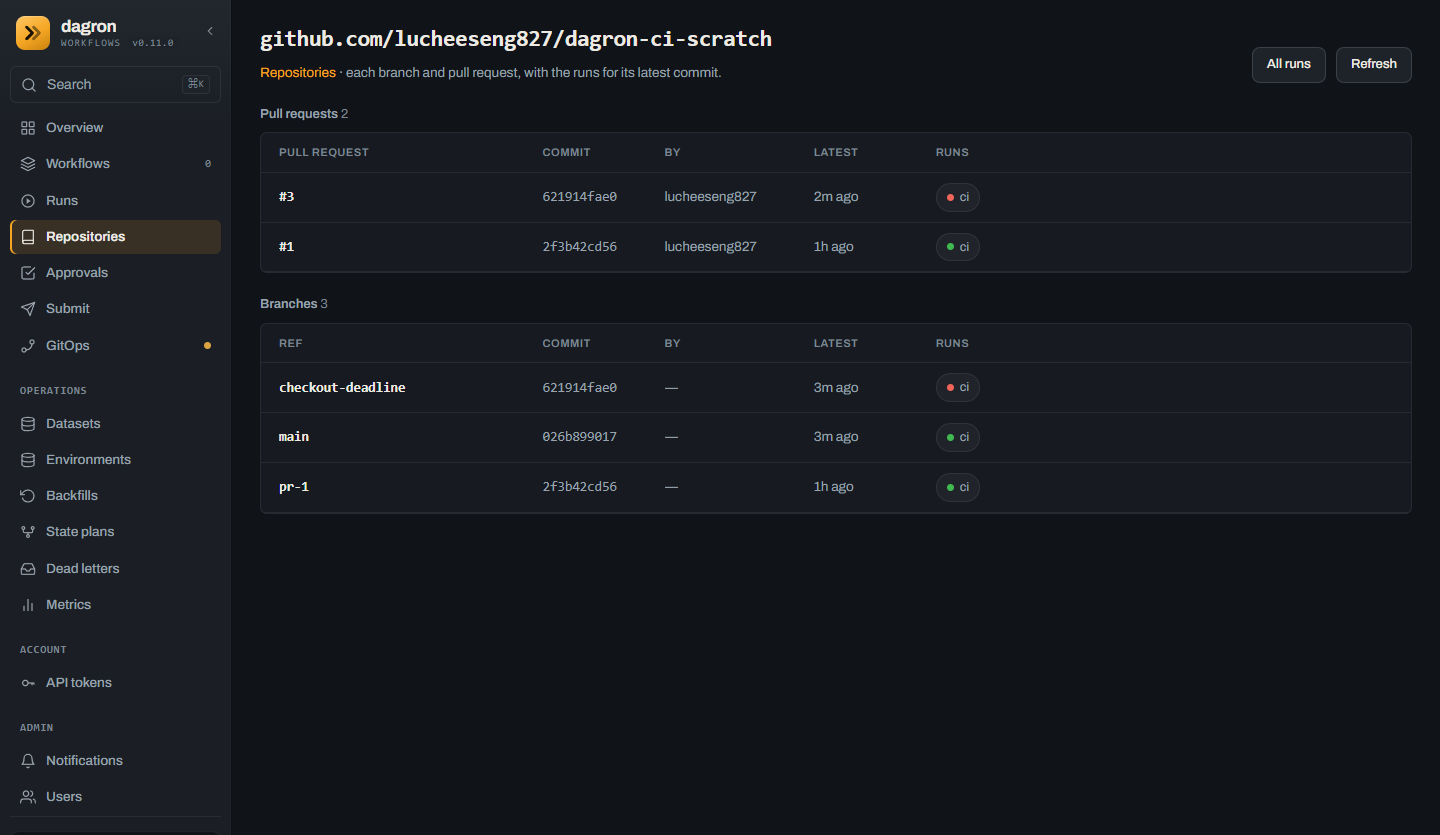
- Repositories in the menu lists each repository CI has run for, the one with the latest run first.
- Pull requests, then branches (and tags), each with its latest commit, its author where the event named one, and when it was seen.
- Runs: the latest run of each pipeline for that commit, its lamp red or green. One that was run again is the same run, and reads as it is now. Each opens the run.
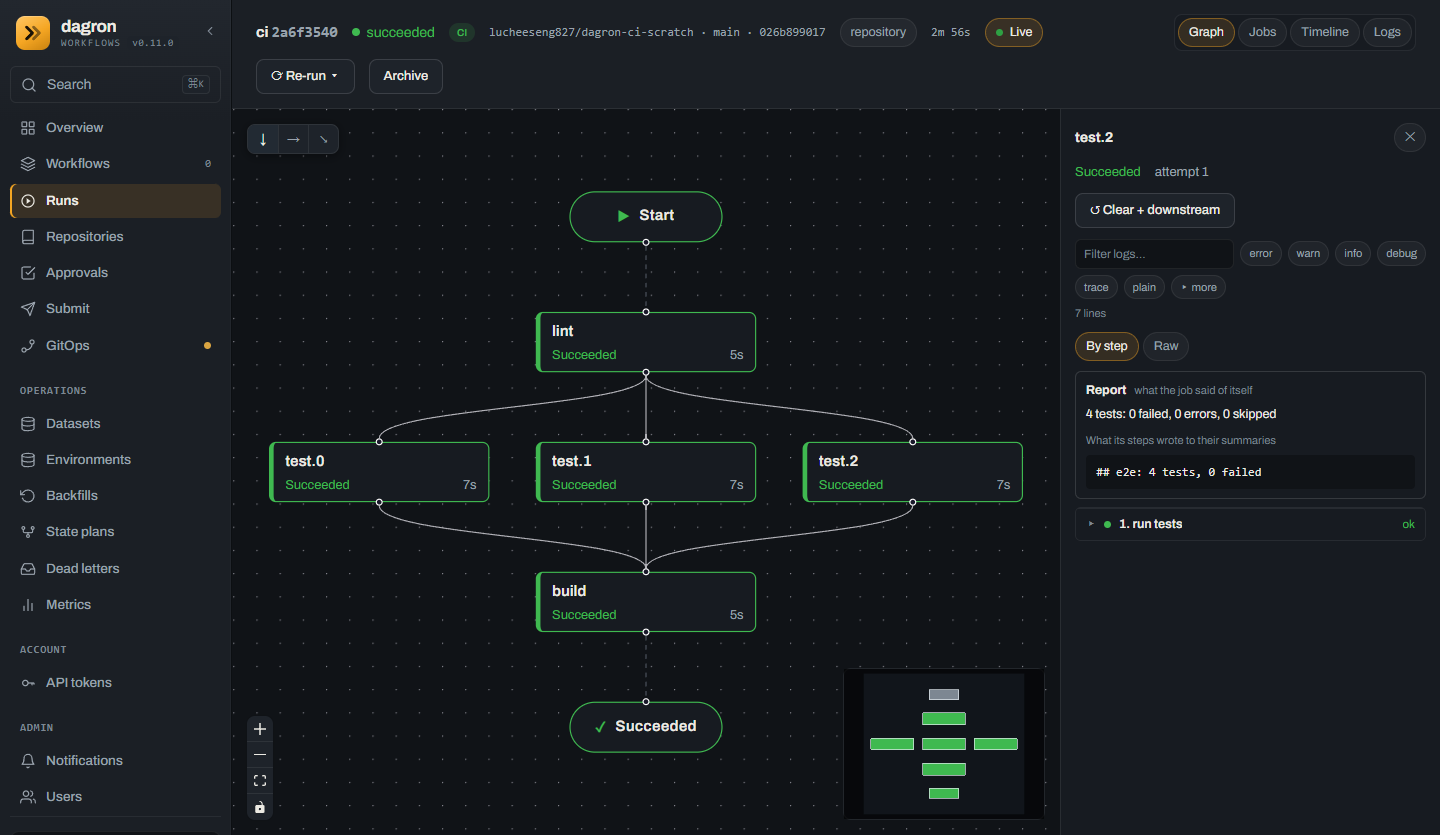
lint, the three test
suites side by side, then build.- The header says it is a CI run (
CI), the repository, the branch and the commit, and links back to the repository's page. - The graph is the same as for any workflow:
depends_onis an edge, and awith_itemsjob is one node per instance. - The drawer opens any job: its report, and its log by step.
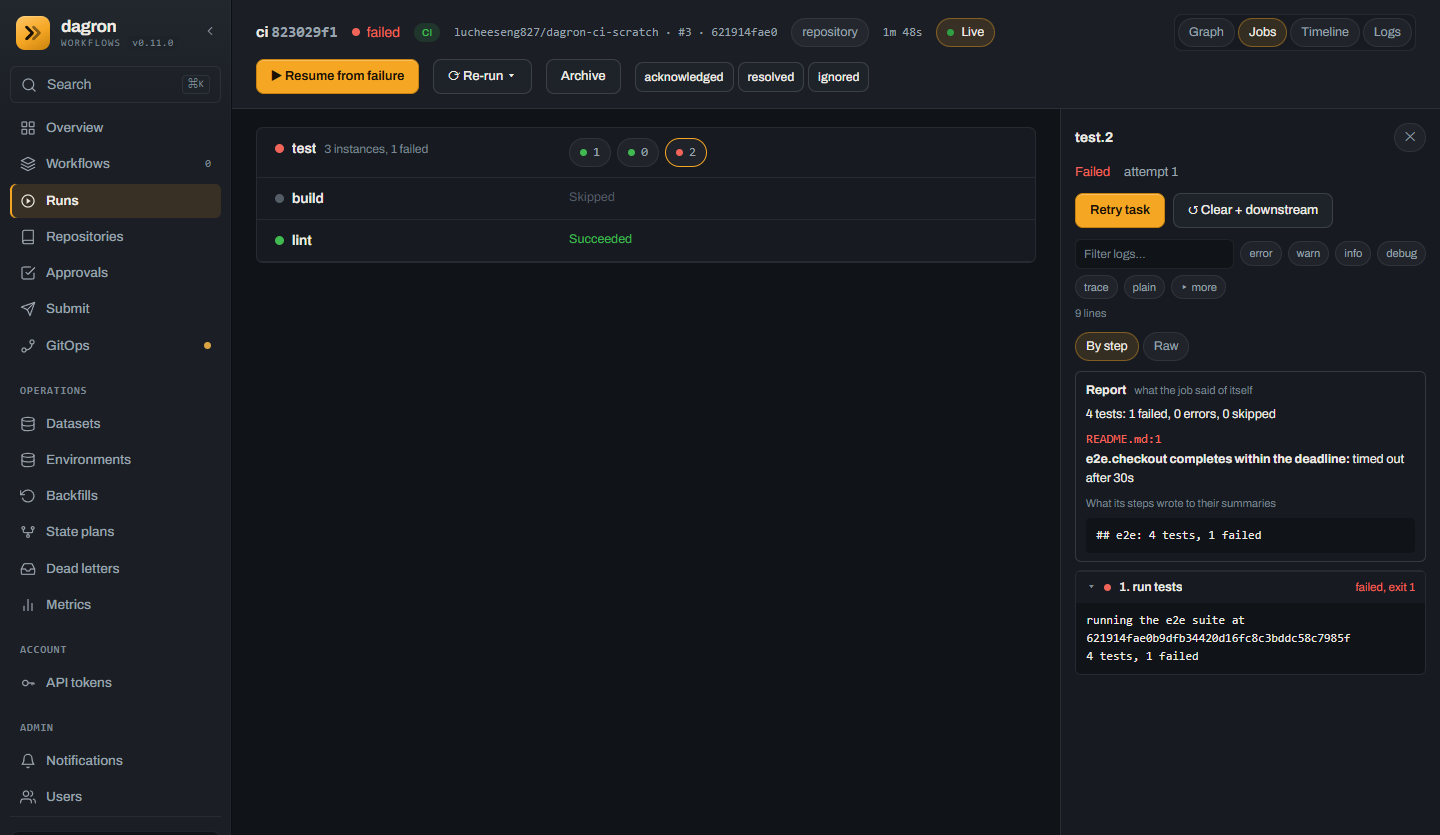
- Jobs, beside Graph: a job is a row, and a job that ran as several instances is a row
of them.
buildafter a failure is Skipped, not run. - Report: what the job's JUnit or SARIF files held — the counts, each failure by name, and the file and line it names. Then what the steps wrote to their summary.
- By step: each step with how it ended. Failed and running steps are open, the rest a click away. Raw shows the log as it was written.
- Re-run in the header runs the failed jobs again, or the whole run.
Rerun, cancel, read a log
The same from a terminal, through dagron-ci's own API. A dagron-api session or API token is the credential; a viewer may read but not rerun.
$ dagron-ci login --server http://127.0.0.1:8090
$ dagron-ci logs RUN_ID --failed       # each line under its job
$ dagron-ci logs RUN_ID --follow       # live, as it runs
$ dagron-ci rerun RUN_ID               # its failed jobs
$ dagron-ci rerun RUN_ID --all         # every job, one that passed too
$ dagron-ci cancel RUN_ID
$ dagron-ci run --remote --repo github.com/OWNER/NAME --ref refs/heads/main --wait
And on your own machine, before a push: dagron-ci run runs a checkout's pipelines
on a real engine there, with Docker.
Check runs, a pull request comment, flaky jobs
Off by default; each is a setting on dagron-ci and a permission on the App.
| Setting | App permission | What you get |
|---|---|---|
CI_GITHUB_CHECKS=on | Checks: write | Each job is a check run, with its test failures as annotations on the lines they name. GitHub's Re-run reruns the run's failed jobs, where GitHub's webhook reaches dagron-ci. |
CI_GITHUB_PR_COMMENT=on | Pull requests: write | One comment on each pull request, edited in place as its runs go: each job, how it ended, and its tests. |
CI_FLAKE_ISSUES=3 | Issues: write | A job that passed only after an attempt failed, three times in 14 days, is filed one issue, kept up to date as it flakes again. |
CI_GITHUB_WEBHOOK_SECRET_FILE | Webhook on | A push runs at once instead of within a minute. Point the App's webhook at https://<dagron-ci>/hooks/github. |
On Kubernetes
The Helm chart installs dagron-ci with ci.enabled=true, as a container in the
engine's pod, beside dagron-api. Have three things first: TLS in front of dagron-api (dagron-ci
sends its token there), the Secrets it reads (its API token, the App's key, and a checkout
secret for private repositories), and the engine's two images
(DAGRON_CI_EXEC_IMAGE, DAGRON_CHECKOUT_IMAGE) through
engine.extraEnv.
$ helm upgrade --install dagron oci://registry-1.docker.io/mancube/dagron --version 0.11.0 \
    --set ingress.enabled=true --set ingress.host=dagron.example.com --set ingress.tls.enabled=true \
    --set ci.enabled=true --set-string ci.cells=default=https://dagron.example.com \
    --set ci.apiTokenSecret.name=dagron-ci-api \
    --set-string ci.githubApp.id=123456 --set ci.githubApp.keySecret.name=dagron-ci-app \
    --set ci.checkoutTokenSecret.name=dagron-ci-checkout \
    --set 'engine.extraEnv[0].name=DAGRON_CI_EXEC_IMAGE' \
    --set 'engine.extraEnv[0].value=docker.io/mancube/dagron-ci-exec:0.11.0' \
    --set 'engine.extraEnv[1].name=DAGRON_CHECKOUT_IMAGE' \
    --set 'engine.extraEnv[1].value=docker.io/alpine/git:2.54.0'
The full walk-through, with the three kubectl create secret lines, is in
CI_QUICKSTART.md.
What 0.11.0 does not do
Said here so that nobody finds out by trying.
- Two forges. GitHub at github.com, and GitLab (gitlab.com or your own). Not Gitea or GitHub Enterprise Server.
- Its own format first. A
.github/workflowsfile or a.gitlab-ci.ymlis run at level 1 — the file itself, with no marketplace action in it — where the operator and the repository both say so. The importer (dagron-ci import) writes a dagron pipeline from either, and from a Jenkinsfile, and names what it could not carry over. - A team's own code, unless the operator says otherwise. Pull requests from forks and non-members are refused by default.
- No artifact store of CI's own. A job keeps caches where the engine has a store for them; elsewhere it starts cold.
- A log is followed live from a terminal, not yet in the console.
- No figure for capacity or timing is claimed for it.
Where the rest is
- CI_PIPELINES.md — every key a pipeline may have:
on:, jobs, steps, services, caches, secrets, reports, concurrency. - CI_MIGRATING.md — from GitHub Actions, Jenkins and GitLab CI, key by key.
- CI_SECURITY.md — whose word is taken for what, and what dagron-ci never holds.
- CI_RUNNERS.md — setting up, bounding and repairing what runs the jobs.
- dagron-ci's README — every setting, endpoint and metric.